Little known fact: I got my private pilot license (VFR) about ten years ago. I’d always wanted to be a pilot, so when the opportunity presented itself I took it. Got 42 hours of instruction/flight time in 2 weeks for about $3,000.
I’ve flown twice since then, and my medical lapsed long ago. It’s a very expensive hobby, and I’ve had other priorities.
I’ve always been interested in flying. I had a plan to join the Army and fly Apaches, but unfortunately that wasn’t in the cards for me. As a teenager, I lived along a military training route so I got to see all kinds of rotorcraft flying about 1000′ overhead. There is nothing more terrifyingly awesome than 10 AH-64Ds and 5 OH-58s buzzing your house in formation.
For the last three years, I’ve lived within spitting distance of an Air National Guard installation. I get C130s doing touch and gos for hours. I get OH58s and UH60s just over the treeline. I also happen to be in “Long Final” for Nashville International Airport, so during congestion I get to see 5-7 passenger jets stacked up waiting to land. It’s pretty neat.
Last year, I saw an article on Hackaday that showed a guy using a cheap TV-tuner to decode aircraft transponder signals. HOW COOL IS THAT?
Unfortunately for me, like many really cool software projects this one was all Linux and C and Mac. I’m a geek, but not that kind of geek. Linux just HATES me. I bought two of the tuners anyway knowing that eventually the Linux guys would make it easy for us Windows folks to play along.
That day has come. Yesterday I got both of my tuners hooked up and receiving ADS-B signals. I’m using the stock antenna, and it’s poorly placed, so my results are not stellar but they ARE working:
Now, how did I get here? Well, first you need the correct tuner. If you want more technical details, google up “RTL SDR” and spend a few hours reading. If not, just get this tuner

I have the slightly-less awesome version running the E4000 chip, but I’m ordering two of these shortly for another project that I’ll talk about at a later date.
You’re also going to need some software (download and uncompress to your desktop or some other folder):
The latest version of Zadig (and 7-zip to uncompress the download)
ADBS# (Project Page)
adsbscope (Project Page)
Got everything? Here we go!
1. Plug in the antenna to the tuner
2. Plug in the tuner to a USB port
3. Run Zadig and replace the driver, following the instructions here. Stop when you get to the section titled “Automated installer”
Note that the screenshots are for an older version of Zadig. Mine didn’t have “Bulk-In, Interface (Interface 0)” as an option. “RTL2832U” was what was presented to me. Also very important: You have to do this once, and only once, for every USB port you plug this in to.
4. Open “ADBSSharp.exe”, which is wherever you unzipped it after downloading. Keep the default settings and hit “Start”
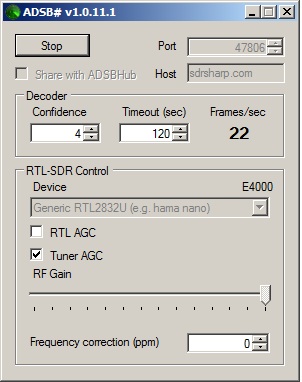
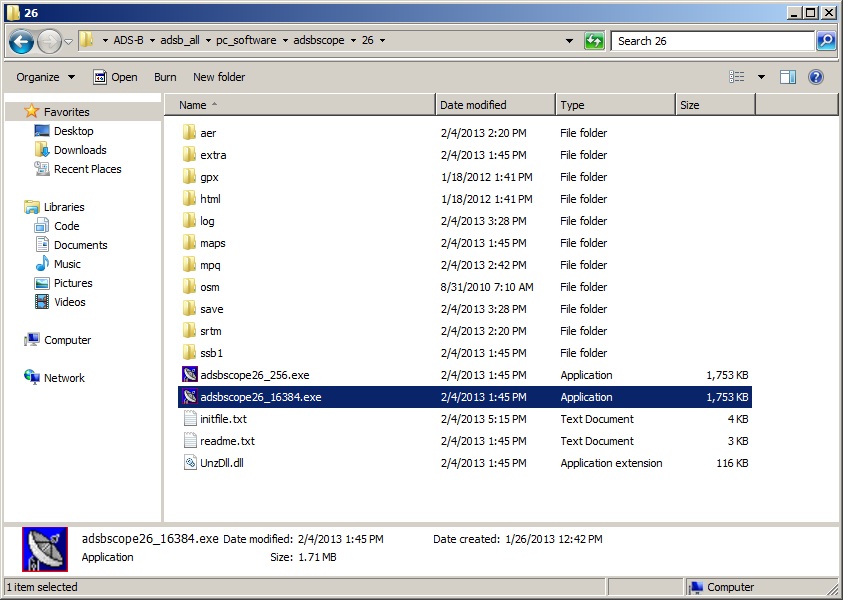
5. Open up adsbSCOPE. It’s pretty far down in the folder structure where you unzipped it. I unzipped it to a folder called “ADS-B” on my desktop, so the executable is “Desktop\ADS-B\adsb_all\pc_software\adsbscope\26\adsbscope26_16384.exe”
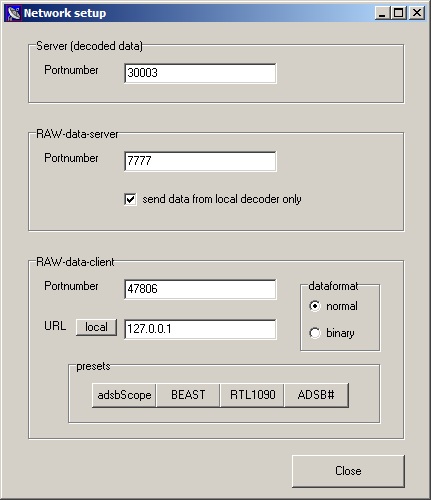
6. Go to other->Network->Network Setup. Change your settings to match these:
7. Hit the inexplicably greyed-out and confusingly-named “start RAW-data CLIENT” button:
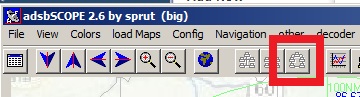
Now you’re reading data! But we aren’t quite done yet. You probably don’t want the map centered in Europe, and you probably want an actual map. To re-center, go to Navigation->goto Town or Airport and choose the closest large airport by it’s call letters.
Next, go to load Maps->Background Picture. That should load a rudimentary map with interstates, and major cities. Go to load Maps->Northamerica USA ex. alaska to load state lines.
That’s it!
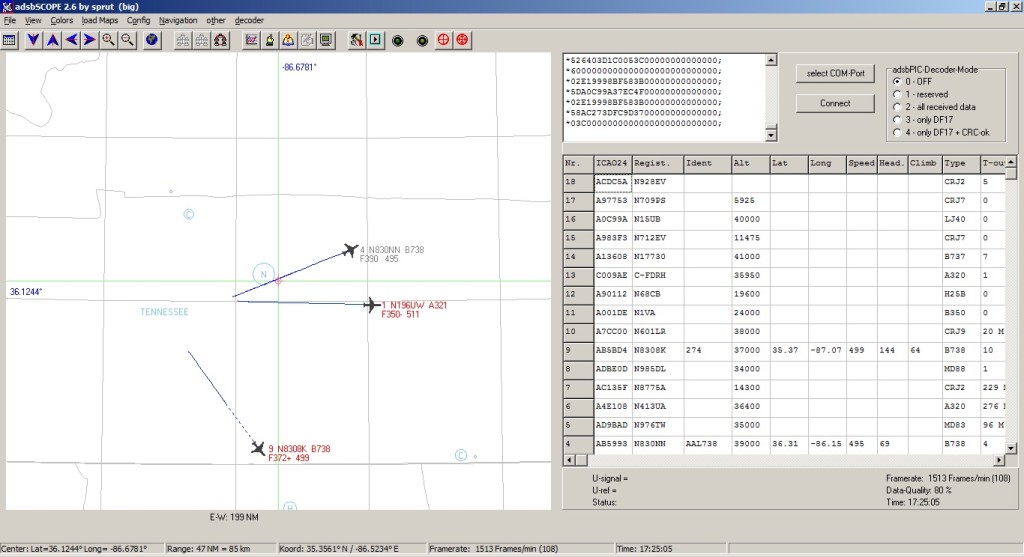
Now, the thing about these signals is that they’re very sensitive to interference. I can pick up only very strong signals inside my office, but at home I pick up a lot more. It’s still not everything, though, because I have trees, buildings, and hills in the way. Also, the stock antenna is not designed for this radio band, so it’s passable but not great. Ideally, you’d want a specially designed antenna mounted on a pole at the top of a hill. There are some other really cool things you can do, like mounting all this stuff remotely and having the data streamed to you or to an online service that will do the mapping for you.
There are other programs you can use to decode the data that comes from ADSB#. I’m going to be testing out a few of them to see what works best for me. I’m interested in an Android app that can decode the signals as well, but my searches so far have been unsuccessful. I have a feeling that a better antenna is really something I should look at, but I’m not quite ready for that yet.
Stay tuned!


Leave a Reply