Category: Tech

  • Some quick thoughts on the Christmas Bombing

    As I write this, it’s been barely 4 days since an RV exploded in downtown Nashville. I’m 15-ish miles away and was never in any danger. Interestingly, I was walking the dog when it happened and I should have heard it, but didn’t.

    There’s still a ton of speculation–some in bad-faith, some in ignorance–about why he did what he did, but I’m not going to talk about that.

    My day job revolves around being prepared for disasters, and this can be treated exactly like a disaster due to the nature of the target. In fact, some of my colleagues have spent much of the last 4 days implementing disaster mitigation plans due to the failure of the AT&T network. I am incredibly proud of the work that they have done both in the last four days and the last four years in preparation for an event like this.

    So, looking at it from a pure communications disaster/widespread failure standpoint, I wanted to note a few things for you to think about.

    Know your local infrastructure
    When I first saw reports of an explosion downtown, I thought it was a transformer explosion. That has happened a couple of time in the last 30 years so it seemed logical, especially considering the area. Like every other IT nerd in Nashville, I knew exactly what that building was and what it’s purpose is. It needs a lot of power, and it’s been there for a gazillion years.

    Once the police said it was “an intentional act” I knew that the AT&T switching station was the target. There was nothing else important in the area (really, who bombs a Hooters?), and a much more politically appealing target–the Federal Courthouse–is only about 10 blocks away. Whoever it was, their purpose was to disrupt communications.

    The AT&T network is not as resilient as you’d think, but it is pretty resilient. A lot of people locally are angry with AT&T because of the loss of cell service, 911 service, internet, etc…but AT&T can only do so much to prepare for something like this. It took almost 5 hours from the time of the explosion until the first widespread outage was noticed. My theory–and I cannot stress enough that this is a theory and not based on actual facts–is that the automated systems started re-routing traffic exactly as intended, but that the load was too much for the secondary systems. Essentially, they moved calls from going through Nashville to going through Louisville, but the Louisville system did not have enough capacity to handle the load of the entire Nashville infrastructure going down. That’s why you had outages up that way, too: Network overload and nowhere to go.

    Sure, they could have planned for this, but then your $80 cell phone bill would be $200. It’s a calculation that every company has to go through and I’m not going to fault them with less than perfect resilience.

    Anyway, the point is that you should know your local failure points. I expected a comms breakdown because I knew the importance of that building. This is important for natural disasters, too. When we had a flood in 2010 and a news helicopter showed footage of the local gasoline depot under water, I knew we were about to have a gas shortage.

    At a minimum, you should know the locations of the following facilities:

    1. The power substation that feeds your home and/or office.
    2. The power plant(s) that feed that substation.
    3. The water treatment facility that feeds your home and/or office.
    4. The distribution point that your fuel comes from. Gasoline, heating oil, etc.
    5. The distribution point that your food comes from.
    6. The switching station or local exchange office that handles your phones.

    If there was some sort of widespread natural disaster in your area, knowing these things may help you make a decision to leave much easier and much faster. In that 2010 flood, for example, two of Nashville’s three water treatment facilities were taken out. The third came very, VERY close to also being rendered inoperable. If that one had been breached, we would have evacuated within an hour or so.

    Communications Redundancy
    This one can be confusing but I’ll try my best. I’m not talking about the need for everyone in your family to have a HAM license and a pre-programmed handheld and mobile radio (although that is useful as we’ll see later). I’m talking about the poor folks here who had AT&T for Voice, Data, TV, Cell Service…the works.

    Those people were completely cut off from the world for 24 hours+.

    The day after my wife and I had our very first date, T-Mobile had an outage that affected something like 8 states. I really needed to call this super-cool girl for a follow-up date because she was leaving town the day after, so I ran down to Target and bought a pre-paid cell phone on AT&T’s network. The day was saved, I got the second date, and now we have two kids, a dog, and a house in the suburbs.

    When we got married, she kept her Sprint phone for a while and I had switched to AT&T after the outage. This was important, because Sprint and AT&T used completely different network technologies at the time. There were no scenarios outside of a widespread long-term blackout where both of us would be out of cell service. That’s a communications redundancy.

    Today, we’re both on AT&T for cell service and we have Comcast for internet. I have Google Voice, so that gives me VoIP for my “cell phone” number and I could still send and receive text messages during the outage. We had some communication ability, but it was limited.

    Then, the day after the explosion, Tactical Dog had a medical issue and had to go to the vet, like, now. She’s fine, but the experience exposed a problem.

    My phone worked on wifi, but only on wifi. When I left the house I was completely isolated. If we’d still had separate cell phone carriers, I could have just taken the other phone, but we’d consolidated to one carrier to save money.

    Everything worked out, I just had to live in 1994 for a few hours. I remember 1994 so I was fine. But it brings me to my final point.

    Have printouts for emergencies
    Right now, can you put your hands on a piece of paper with your local EMS/Fire dispatch’s phone number? Or your doctor’s? Or your veterinarian’s?

    One of the effects of the bombing was a widespread, multistate 911 outage. Everyone had to call either the non-emergency dispatch number or the local precinct/fire hall/whatever. There were lists floating around twitter and the Emergency Management websites but you had to know where to look. And you had to have internet, which you may not have had.

    I was fortunate enough to have been to the vet’s so many times that I knew how to get there without the aid of GPS (which would have required downloading map data since our vet is outside the area we normally roam around in–which is a story for another day). If the way I knew how to get to the vet’s office had been blocked, as might be likely during a more widespread disaster, I’m not familiar enough with the area to have routed around it quickly without the aid of a map.

    A pre-printed map, or a paper map with important locations already marked, could have been a literal lifesaver for about a 36-hour period. I bought a good old-fashioned paper map last January just to keep in the car. Something to think about.

    The last thing I wish I’d had beforehand was a list of local repeater frequencies, either pre-programmed or printed out. This is amateur radio specific, but as I sat in the vet’s parking lot waiting on them to treat the dog, I realized that my little handheld was way, way out of range of the repeaters I normally use. Again, the vet is outside our normal operating area, but it’s close enough that I really should have put those frequencies somewhere handy.

    So that’s all I have for now. Just a few lessons-learned from someone on the ground with a somewhat unique professional perspective.
  • A 3D printed 6 switch panel for Jeep XJs

    Alternate title: What I’ve been doing instead of blogging.

    We mentioned on last week’s episode of the GunBlog VarietyCast that I have designed a new lower switch panel for 1997-2001 Jeep Cherokees, known in JeepSpeak as the newer XJ.

    As of right now, I have seven different models for sale in my Shapeways store.

    So here’s the story:
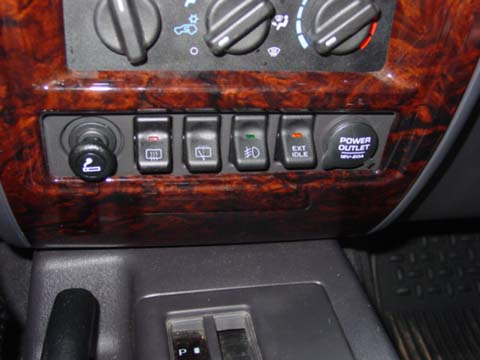
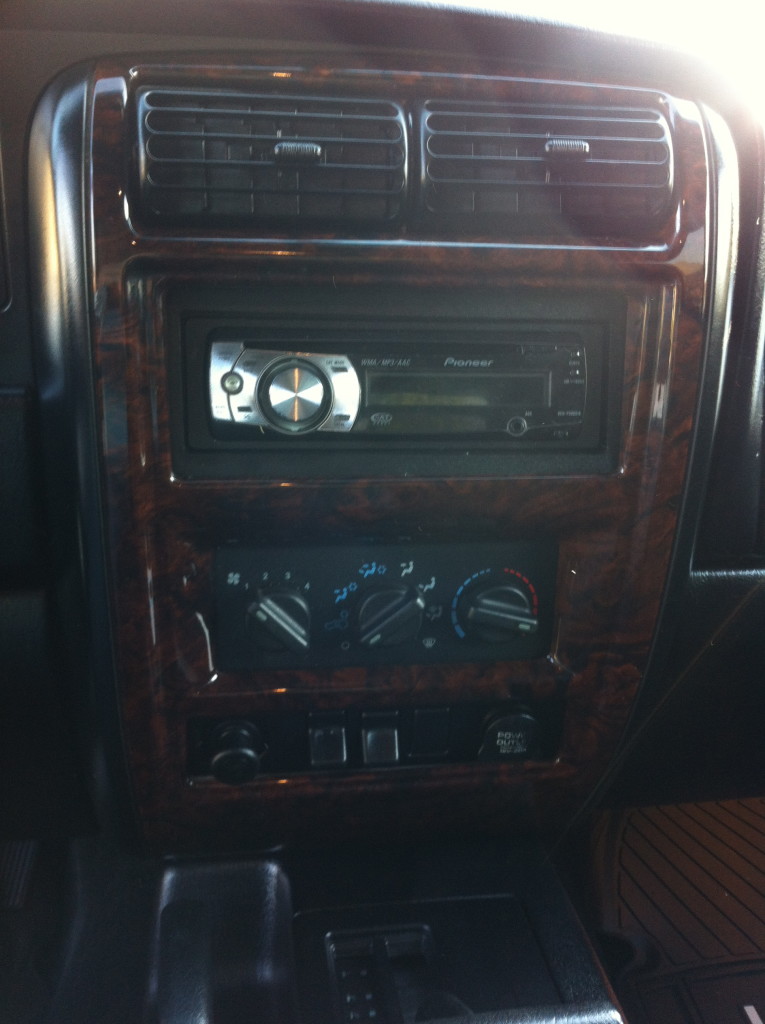
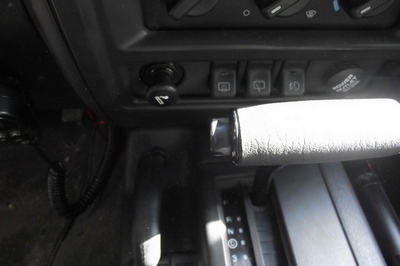
    Jeep sold the XJ with one of three different lower switch panels, depending on trim level and options. They all have two 12v power ports–a driver side one that is only on when the key is in ACC/RUN, and a passenger side one that is always on.

    They came in three flavors. One with two switches and a blank that is actually solid and completely unable to be converted to hold a third OEM switch:
    2-switch

    One with three switches for models with factory fog lights:
    3-switch

    And a super-rare 4 switch model that came ONLY in police package models domestically, and in some European export models that also had rear fogs (which is apparently a thing in Europe):
    xj_switch_ext_idle

    So here’s the thing, though: You CANNOT buy the 4 switch panel anymore. Jeep doesn’t make or carry them, and the parts distributors ran out years ago. They occasionally pop up on ebay for $225 or so, with no switches.

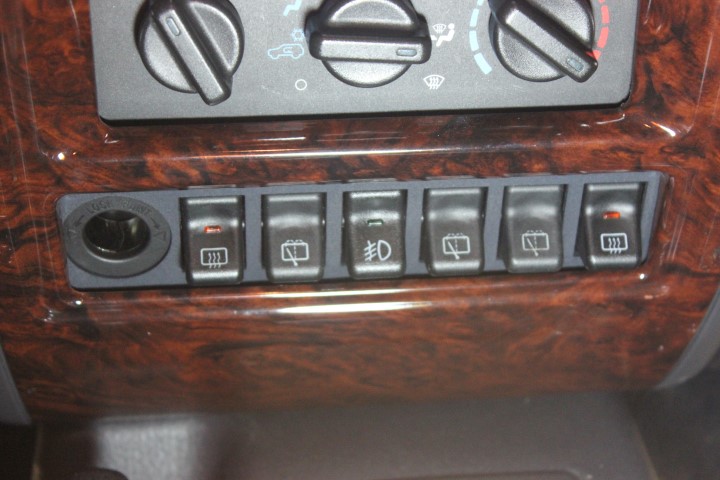
    And here’s mine, with SIX switches:
    IMG_5456 (Small)

    It took about 6 months of designing, prototyping, breaking, and redesigning the panels on hobbyist-grade 3D printers (using makexyz.com as my prototype provider) before I got one that I was ready to try out on Shapeways.

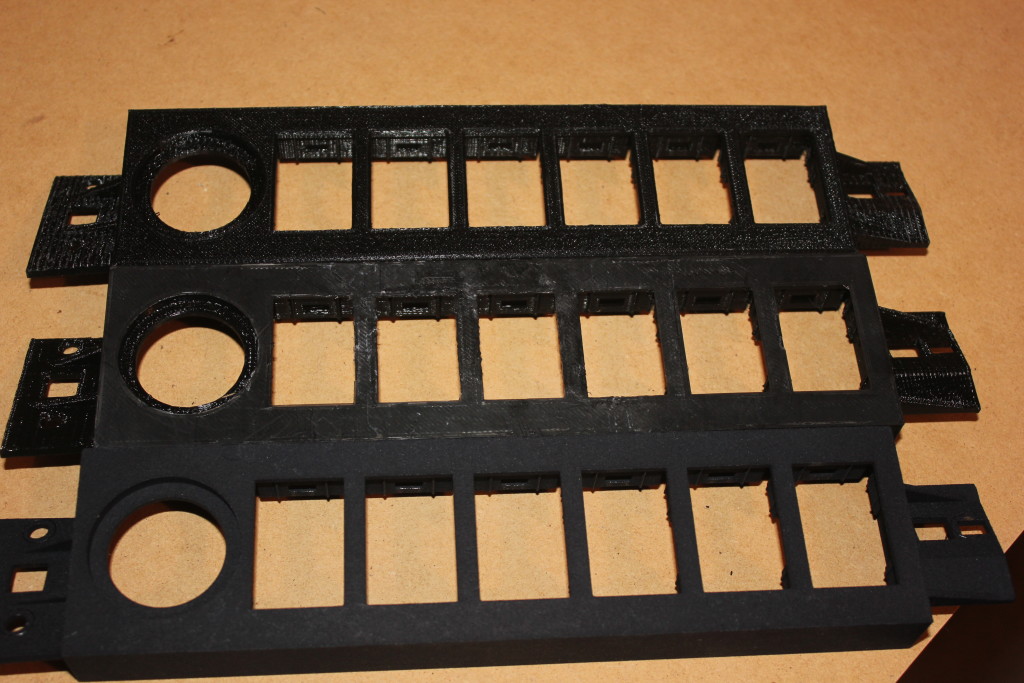
    The makexyz printers–depending on who gets your design–can range from $800 to about $2500. The prints are functional, but the quality is…variable. I sent the exact same design to three different printers and got three very different results, structurally speaking.

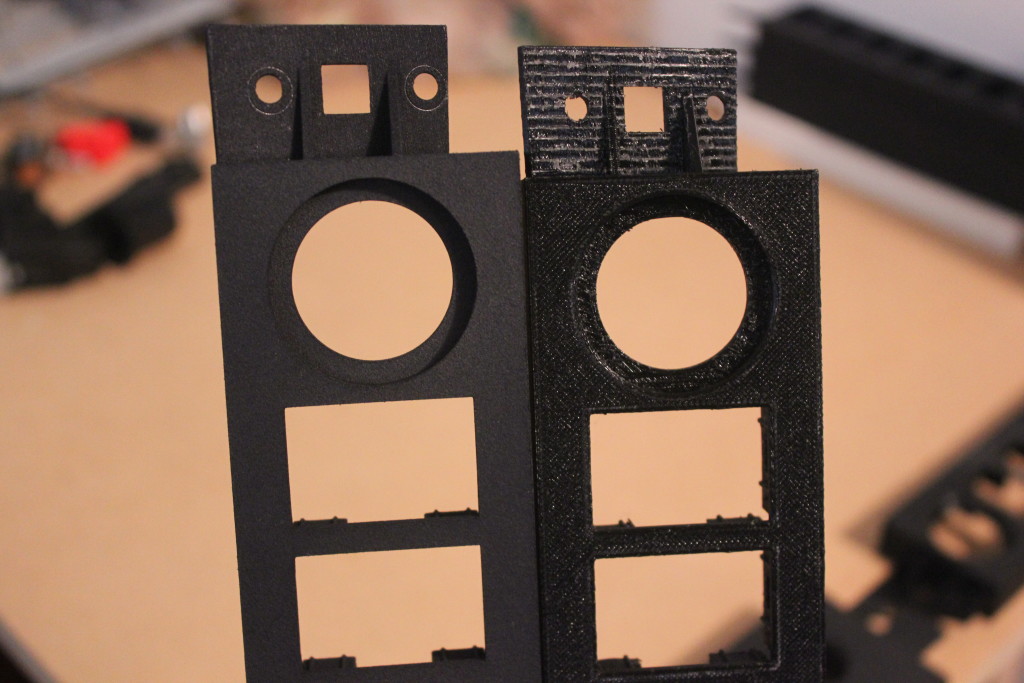
    Shapeways uses Stratasys printers, which start at $200,000 each, and produce much more finished products. The two on top here were makexyz prints, the bottom is the Shapeways print. Click to embiggenate.
    IMG_5477

    Left: Shapeways, Right: makexyz
    IMG_5466

    Now I feel like I’ve got the design down I can make custom ones, too. I did 5 models in two hours one Sunday.

    So now I have a product, available for sale, that is manufactured on-demand and shipped to your house with no interaction from me. I love living in the future!

  • Okay, Google. Start the Jeep!

    So this happened:

    Now let me tell you how I got all that to work.

    Hardware:
    Raspberry Pi 2 w/Case
    16GB Micro SD Card
    TP-LINK TL-WN722N Wireless N150 High Gain USB Adapter
    5db Antenna
    SainSMart 4 Channel Relay Module
    Wire Jumpers
    2A Car Charger
    Avital 5103L Remote Start Car Alarm

    Software:
    Tasker
    AutoVoice and the unlock code
    Raspbian
    WiringPi
    Apache
    PHP

    The high-level workflow goes like this:

    • Activate Google Now on my Note 4 by saying, “Okay, Google”
    • Send Google Now the command “Start the Jeep”
    • AutoVoice intercepts the command and kicks off a Tasker task
    • Tasker launches Chrome with the URL that corresponds to a PHP page on the Pi
    • That PHP page calls the WiringPi library and sets a GPIO pin to out mode, then activates that pin for 2 seconds and deactivates it
    • The relay card accepts the GPIO signal and energizes one of the relays for that 2 second interval
    • The relay is connected to the Remote Start Activation wire on the Normally Open side of the relay and the Jeep’s Ground on the common terminal, so when the relay is energized, the Remote Start Activation wire is grounded
    • The alarm recognizes that the Remote Start Activation wire is grounded, and kicks off the black-box-to-me remote start process.

    Unfortunately, I don’t have it working with my Samsung Gear Live Android Wear watch yet, but I’m confident I’ll get that figured out.

    It’s important to note here that I wrote exactly 6 lines of code here, and two of those lines were the PHP opening and closing tags. This is not a project that requires a lot of that kind of expertise. Familiarity, yes, but not expertise.

    The Remote Start

    When I bought my Jeep, the previous owner had installed an Avital 3100L car alarm. I’ve had a few cars with remote start, so when the alarm started flaking out on me, I replaced it with an Avital 5103L Remote Start Car Alarm. The reason why I went with that remote start is, frankly, because it shares a harness with the 3100L. I didn’t want to have to re-wire the door locks, starter kill, dome light, etc. if I didn’t have to. Plus it was only like $80. Now that I’ve had it for a while, I know I should have spent the extra $30 and gotten the two-way pager model.

    Avital is a DEI brand–like Viper, Clifford, and Python. DEI sells an internet-connected alarm add-on module for like $170 plus $70 a year. As of mid-August 2015, their “new version 4.0–coming early 2015” is still not ready yet. My point is that my Avital alarm has a wire that, when grounded, activates the remote start capabilities of the unit.

    This is good, because now we can use this dedicated, purpose built hardware to accomplish the most difficult part of all this: Actually starting the Jeep!

    Now, my Jeep is a 98. It’s old. It doesn’t have factory security or any fancy RFID keyfob. DEI has modules that can bypass those things, but they cost extra. Installing a remote start is not for the faint of heart, especially in a newer vehicle with 37 different kinds of security. Remote Starts essentially hotwire the car, and automakers have spent the last decade or so trying to make it very, very difficult to do that.

    The Raspberry Pi 2

    I finally broke down and bought one after Barron plugged it on GBVC EP27. And yes, it was my plan all along to use it for this purpose since I knew about that remote start activation wire.

    In addition to my home wifi network, my employer provides a guest wifi network that I can have the Pi connect to. I haven’t gotten this part fully worked out yet, but the plan is to have the Pi connect to my OpenVPN instance at home and route the commands through that. I don’t want other people on the guest network to be able to randomly start my Jeep during the day 🙂

    In order to make sure the Pi can actually reach the guest network, I bought a TP-LINK TL-WN722N Wireless N150 High Gain USB Adapter specifically because it has an external antenna connector. I also bought a 5db Antenna, but I’m not sure that’s actually getting me anything. Fifteen years ago I had a little magnet-mount 2.4ghz antenna specifically designed for WarDriving with an Orinoco card and I hope to find something like that. It was a great little antenna.

    The Relay Card

    The GPIO pins on the Pi can only handle a very tiny amount of current. It may be possible to set up the Pi in such a way that the relay card is necessary, but the card was only a few dollars and I can use the other relays for other things, like rolling down my windows or turning on my rear defrost.

    In order to avoid the possibility of frying either the Pi or the Alarm brain, I got the relay card to isolate the two.

    The card can be powered by the 5v line on the Pi 2. I’m not sure if I’d want to power all 4 relays simultaneously for an extended period of time, but for my purposes this is fine. One thing to note is that my card activates a relay if it is receiving a 0 on the GPIO line, not a 1. I had to compensate for that.

    The Pi Software

    I’m not going to lie: I totally followed this fabulous Instructable to get me to a point where I could hit a single page and activate a relay for 2 seconds. I didn’t do steps 5 or 6 because it wasn’t necessary for me.

    Here is the entirety of the code that I wrote for this project:

    <?php
    system ( "gpio -g mode 4 out && gpio -g write 4 1");
    system ( "gpio -g write 4 0");
    sleep ( 1 );
    system ( "gpio -g write 4 1");
    ?>

    That’s saved as RemoteStart.PHP. Hit http://your.pi.ip/RemoteStart.PHP and BOOM! Relay fires for 2 seconds:

    Hard, eh?

    The Android Software

    I bought Tasker about a year ago because everyone says it’s awesome and I had $10 of Play credit to use. As part of this project, I also installed the AutoVoice plugin for Tasker, and then bought the unlock code because it was $1.34 and in order to use the 7 day trial version, the developer wanted me to sign up with an account on some gaming site. Eff that. Take my money.

    Now, I thought that AutoVoice was to make this work with my Android Wear, but I was wrong. This is to make this work with regular Google Now.

    The AutoVoice page on Play has a pretty good video tutorial so I’ll refer you to that for how to set up the AutoVoice portion.

    For Tasker, you want to set up a Task and call it “Start the Jeep” or whatever. Add a “Net” action for “Browse URL” and put your URL in there. Hit the play button to test it: Your default browser should open and go to that page. If not, something’s not right.

    On the Profiles tab, create a new Event Profile. Select Plugin->AutoVoice->Recognized. Do the Speak Filter thing they demonstrate in the video tutorial and say “Start the Jeep.”
    The Enter Task dialog will pop up. Select the task you created.

    NOW THIS IS VERY IMPORTANT! You have to actually activate Tasker! I didn’t at first and was angry–AutoVoice was showing a popup (sprite) saying that it recognized my “Start the Jeep” command, but then it wasn’t doing anything! If you don’t have a lightning bolt icon in your system bar up top, Tasker is not active.

    Test it out!

    Putting it all together

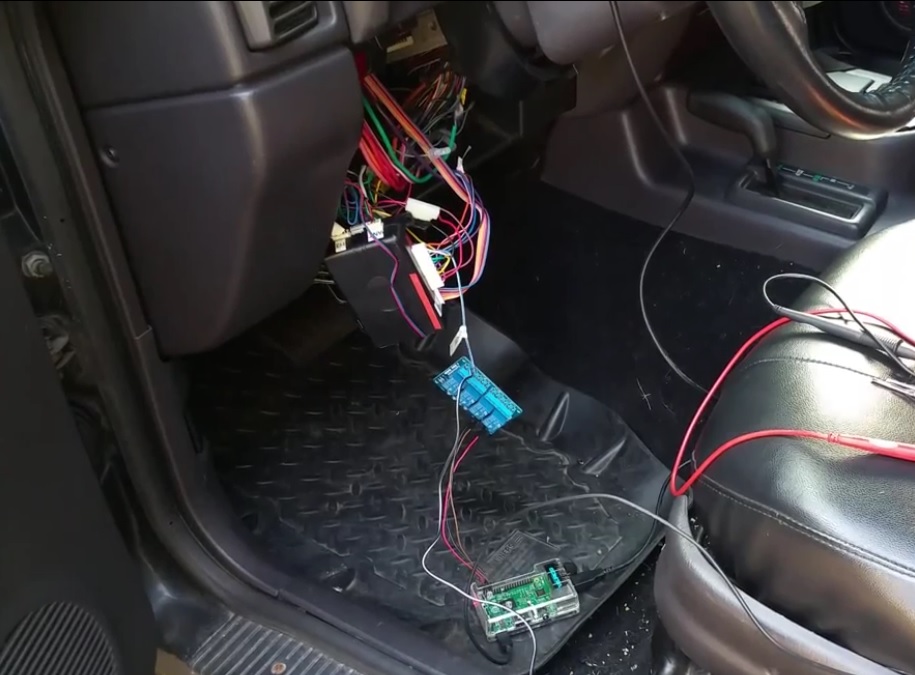
    So now that all the pieces and parts are working, we put it all together in Proof-of-Concept form:
    Pi Remote Start

    And everything should work…as long as you’re connected to your network.

  • Slow load times, etc

    All of the sites on my hosting account are getting hammered pretty hard by bots in China and Russia. This is resulting in some pretty awful site load times. I’m banning IPs as fast as I can but it’s not fast enough…

  • Some house keeping

    If you’ve been hit by one of those annoying “please wait x seconds for a word from our sponsor” ads, please know that this is not intentional.  Turns out sitemeter has decided to turn into adware and inject this redirect code into our website.  At least, according to this site, and this site, that is the case.

    Wizard will be removing sitemeter from our site when he gets home from work tonight (Done – ed.), and I suggest you do the same if you have it installed on anything you own.

  • Why did RAM prices double?

    Two years ago I bought a pair of 8GB DDR3-1600 sticks for $86. Now, they’re $155.

    It’s not like DDR4 and DDR5 came out, and now I’m looking for stuff that’s no longer manufactured. What happened?

    (Hard drive prices are still higher than when I bought my last pair of 2tb drives, but there was a natural disaster that wiped out most of the factories. That I understand. This baffles me.)

  • Conversation with an Apple Fanboy

    Yesterday there was some conference or something. Guy that sits next to me spent most of the morning reading Engadget and watching some presentation by that guy that’s not Steve Jobs.

    Him: OMG! The new versions of iOS and OSX will allow you to answer phone calls on your computer!!!

    Me: Oh, like Google Voice?

    Him, somewhat indignantly/sarcastically: You mean if I call your cell phone, your computer will ring?

    Me: Yes.

    Look, I’m sure that iProducts are nice and all, it’s just that Apple doesn’t innovate fast enough for me.

  • Protip: Web Developer Edition

    If you’re going to limit your password field to 12 characters on your login page, you should probably also limit your password field to 12 characters on your registration page.

    Related: As a general rule, if you’re going to have criteria for passwords, it’s probably best to let the user know that.

    That way you don’t have someone who uses a password manager–like me–input a random 16 character password during registration, only to immediately have to use the “reset my password” feature because I can only put 12 of my 16 characters in the box.

  • Well, that was short lived

    Step 1: Read this.

    Step 2: Buy this:

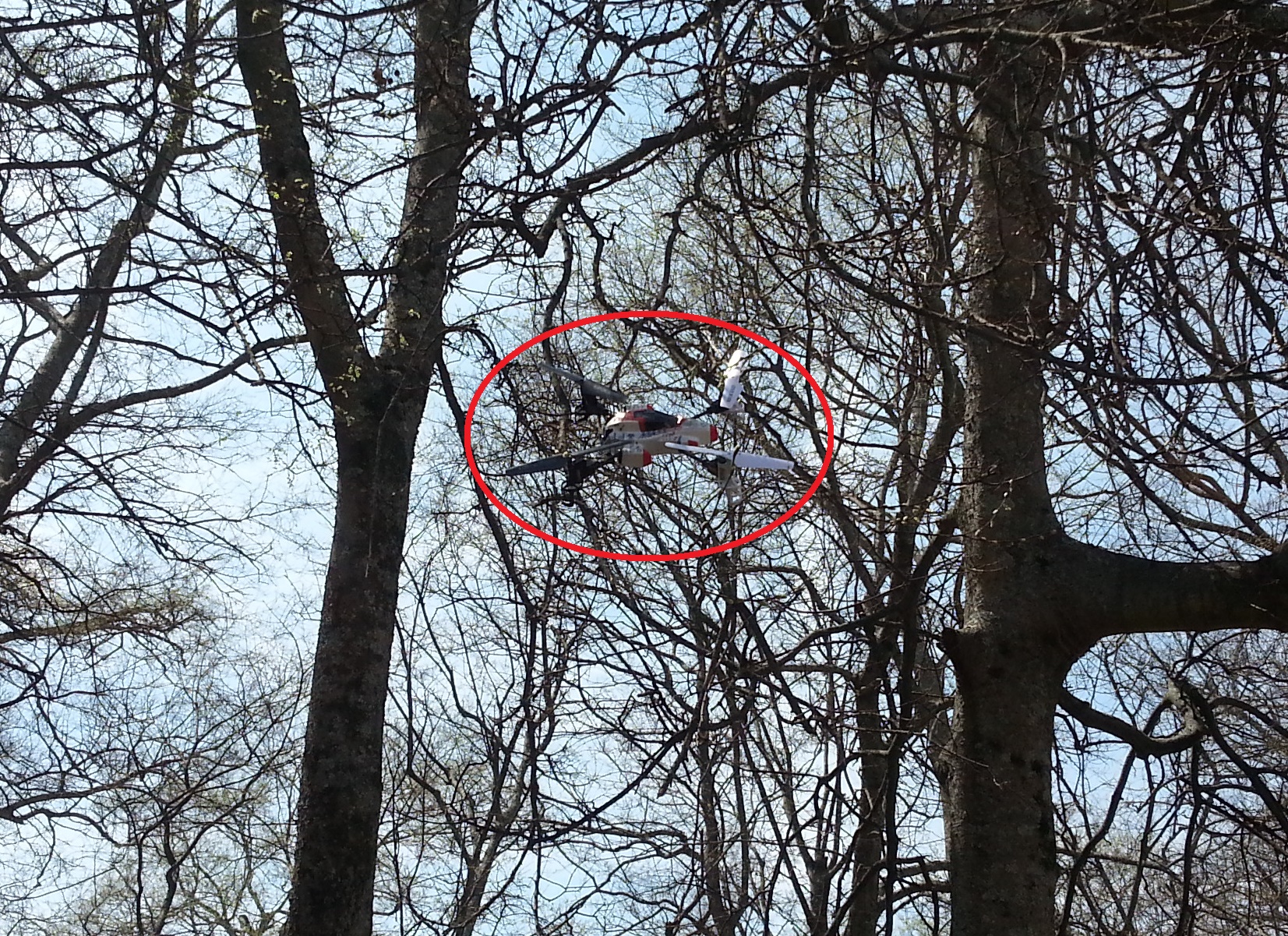
    Step 3: 15 minutes after opening the box (click to embiggen)…

    smya x1 in a tree

    Yeah, I probably had two minutes of flight before getting it stuck in the tree. The first time. Happened two more times after that before the battery died. Luckily I was smart enough to not get enough altitude that retrieving it would require more than a stick.

    Tactical Dog Approved (TM)

  • Remember when µTorrent was, um, µ?

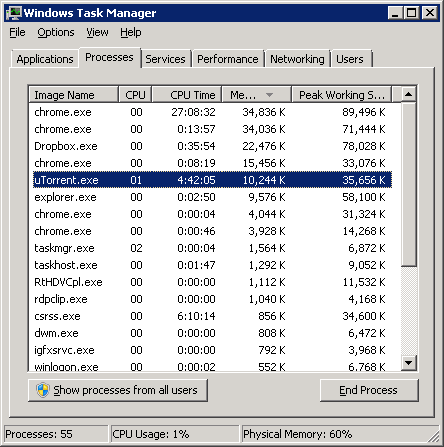
    µTorrent 3.2.3, running for 10 days:
    ut3.2.3

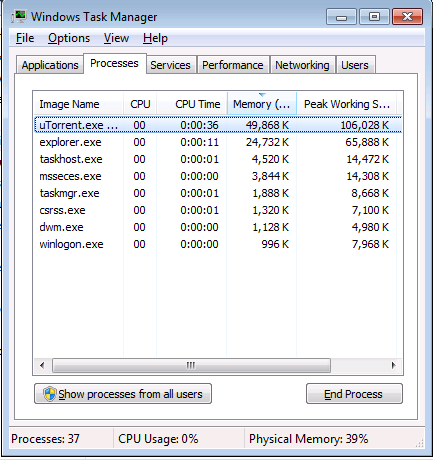
    µTorrent 3.4, running for 12 hours:
    ut3.4

    Way to go, guys.