Category: Android

  • New Smartphones

    So… I’ve been using a Samsung Captivate for a couple years now.  It’s the only Android phone that I’ve used to this point (my previous 2 phones were Windows Mobile), and I’ve been pretty happy with it.  Especially once I dropped CyonogenMod 7 on it so I could actually use a bluetooth headset properly with it.  I’m currently running CryogenMod 9 (Ice Cream Sandwich).

    Like I said, I’ve had this phone for a couple years, so it looks like it’s time for an upgrade.  So far, the two that I’m looking at are the HTC One X and the Samsung Galaxy III (which may be out early May).  The specs of these phone blow my mind.  Both have the Tegra3 quad-core 1.5GHz processor, 1GB of RAM, at least 16GB of storage space, and apparently a separate GPU.  Pretty sure my netbook that I still use has lesser specs.

    Oh, and when I bought the Captive 2 years ago, I thought it was freaking huge.  Most smart phones on the market today are even bigger.  A few by a good bit.

  • Deal Alert: Verizon Galaxy Nexus for $99

    If I weren’t waiting on the Sprint version, I’d totally jump on this:
    Samsung Galaxy Nexus 4G Android Phone (Verizon Wireless)

    It’s new customers only, so if you’ve been waiting for a flagship phone to go on sale, this is it. Dual core 1.2ghz processor, 1080p camera, and a 4.65 inch screen. Totally hot.

  • Making a USB power cable for a Belkin F8Z492-P Bluetooth Music Receiver

    UPDATE 7/1/2012: Several people have emailed in and said that instead of making a cable, you can use an iGO Charger A00 Tip with either the USB to iGo Charging Cable if you already have a spare usb power port or the Mobility iGo Auto Charger if you only need to power the receiver.

    UPDATE 1/24/2014: If you’re thinking about buying the F8Z492-P for in-car use, I have two alternatives to suggest. First, this product from Belkin appears to be their answer to folks that bought the F8Z492-P and got upset that it wasn’t really meant for in-car use. It’s a little pricey, so the other option I have for you is the Kinivo BTC450. I don’t have either because I’ve changed cars twice since originally writing this post and no longer have the need for a device such as this.

    ORIGINAL POST:

    As I mentioned in my Christmas Bounty post, I got a Belkin F8Z492-P Bluetooth Music Receiver as a gift.

    Now, seeing as this is the marketing photo:

    I falsely assumed that it was rechargeable. Otherwise, how would the power light be on with only the audio cable attached, like the picture shows? As it turns out, this device is designed to connect to a home stereo and get power from the included 5v 180ma power supply.

    That pretty much defeats the purpose of me getting this, since I don’t have/want to run a power inverter just to run bluetooth audio. So I decided to get around that problem.

    At first I went into my box o’ junk and found an adjustable DC power converter. That device is kind of like this one, but older. It has a 6v and a 4.5v setting, but not a 5v setting. I tend to prefer to undervoltage by 10% rather than overvoltage by 20%, so I set it to 4.5v and plugged in the proper tip.

    ZAP! Blew the 1A fuse on the converter. Well, crap. Back to the drawing board.

    I thought about buying a 5V Voltage Regulator and wiring that directly to a switched 12v source, like tapping in to the windshield wiper fuse or something. Then I remembered that I have two USB ports on my USB car charger (like this one), and I’m only using one of them.

    USB spec is 5vdc @ 500ma. PERFECT! Now I just need a cable. Which I don’t have.

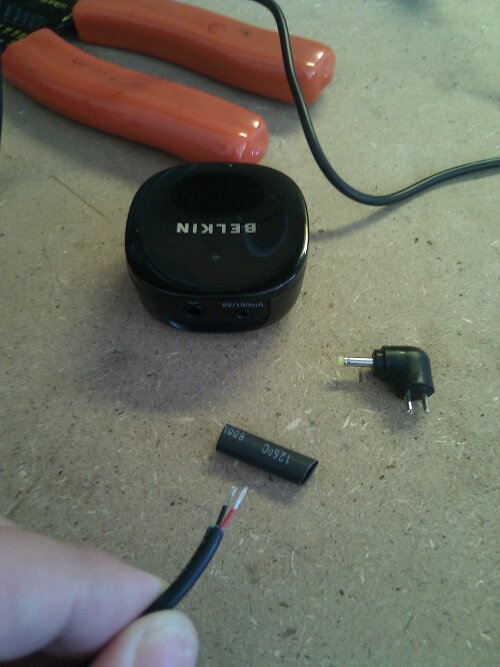
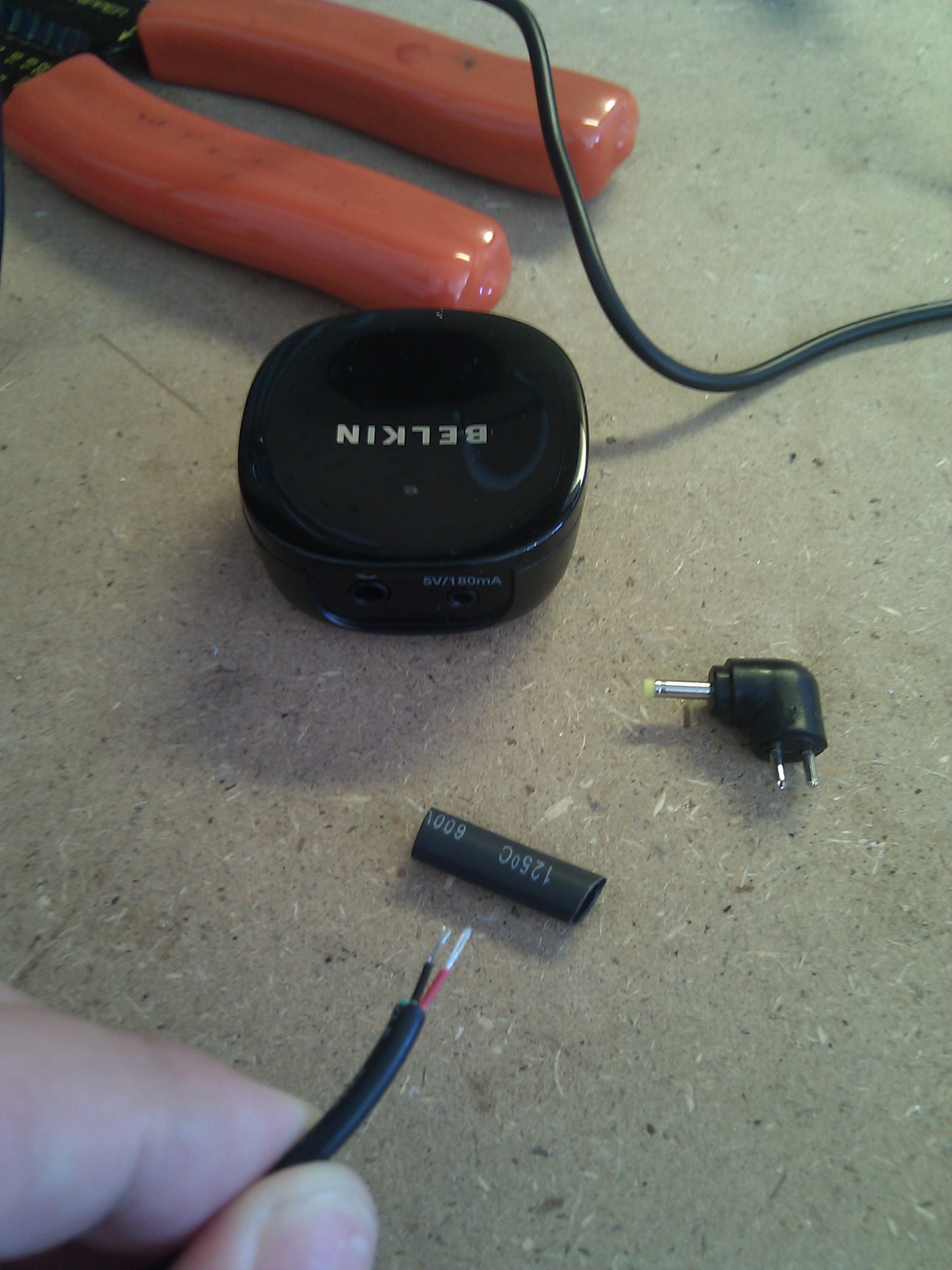
    So I made one. I took a standard USB cable and cut off the end. There are four wires, but we only need the power ones (Black = negative, Red = positive). So I took my stripped cable and my barrel connecter, along with some heat shrink tubing:
    image

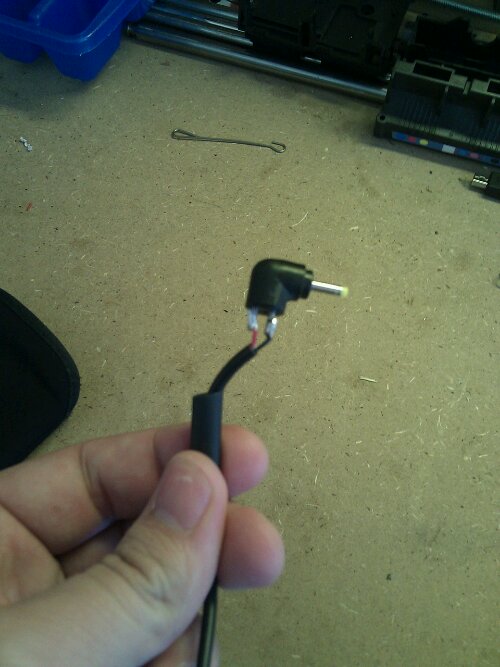
    Soldered the wires to the connector, after slipping the heat shrink tubing onto the cable:
    image

    And voila! I tested the cable and it worked! Then I slipped the heat shrink tubing over the exposed wires and got after it with a lighter. That should keep it from shorting. Works like a champ!

  • Freakin Finally

    image

    Logitech Revue got the 3.1 update

  • Well crap

    My 5 year old SIM card just died, and the AT&T stores closed like an hour ago.

    So me and my grandfathered unlimited data plan are going to try to get a new one tomorrow.

  • Finding 100% gasoline

    As you know, my wife and I drive older cars. About a year ago, I had to have several hundred dollars of work done on mine to fix a seriously bad misfire problem. Rough idle is one thing, running rough at 70mph is an entirely different matter.

    As it turned out, the ethanol blends I’d been using had gummed up my fuel injectors (among other things) to the point where they had to be replaced. I had heard of this happening to cars that were older than my 1999 Jeep, but I was a bit surprised it happened to me. There are other benefits to running pure gas, such as better fuel economy, increased horsepower, and it makes Al Gore cry.

    So, what to do? How do you know where to get 100% pure gas?

    Pure-Gas.org has a crowdsourced list of gas stations that claim to have pure gasoline. Again, it’s crowdsourced, so it’s not a complete list. Sometimes gas stations switch to E10 or E15 blends, at which point you should update the list to remove them. I’ve been using that site for a while now to locate gas stations, especially while traveling. In fact, when I went to the LuckyGunner Blog Shoot I pre-planned a gas stop based on this list.

    (Just add this to the list of ways government intervention in markets is a real PITA.)

    Anyway, one of the features of that site is they provide a KML file for all the pure gas stations in the country. I wanted to make a web app that would plot your GPS position and this KML file so I could more easily find stations if I’m on the road. I spent about an hour whipping something up, and then found these instructions on how to, in a roundabout way, import the KML file to your mobile Google Maps application. Huge bonus for Android users: You can pick a station on the map and get voice navigation.

    SCORE!

    Here are the basics:

    1. Log in to maps.google.com with your Google account.
    2. Click on “My Places”
    3. Click “Create Map” (big red button)
    4. Click “Import” (link, above the title and the the right of the Done button)
    5. In the “Or enter the url of map data on the web” box, put http://pure-gas.org/temp/pure-gas.kml
    6. Hit Upload (you may have to hit enter first to get the Upload button to activate)
    7. Now, on your Android device, open the Google Maps application
    8. Click the Layers button
    9. Click “My Maps”
    10. Select the map you created

    My quick test reveals that not all stations are showing on my mobile maps app, though. I suspect there is a limit to the number of markers the mobile app can handle, so it just loads the nearest five hundred or whatever. I’m heading back to Atlanta in a few weeks, so I’ll be able to test it then.

    I also don’t know if this method will update your map with any changes to the KML file. I’ll have to check that out, too.

    If you don’t care about navigation, or that’s a wee bit too much work for you, I’ve got the location-aware version of the pure-gas.org map here. The work was done under the Creative Commons license.

  • Tragedy!

    Last night my Nexus One fell out of my pocket and onto the cement. It fell in such a way that the protective neoprene sleeve came off the phone and it slide about two feet across the concrete face down. The impact cracked the glass in the top left corner, but the screen is okay.

    The phone basically lost most of its resale value in that instant.

  • I’ll take “Things that sound like a terrible idea for $200, Alex”

    Google Wallet

    [youtube http://www.youtube.com/watch?v=DsaJMhcLm_A&w=640&h=390]

    Let’s set aside the fact that the only way to get this is with a Citibank Mastercard credit card or Google Prepaid card, and that it only works with one phone on one carrier (Sprint Nexus S 4G).

    Does anyone think this is a good idea? Right now there is a group of hackers in Russia salivating.

    “Oh, well, you have to unlock it with a PIN, so it’s more secure than a regular wallet!” Yeah, right. The practical effect of this will be that the guy in front of me at Starbucks will have to pull out his phone, unlock it, open the app, unlock that, and then pay for his drink. Yeah, I know, I’m impatient.

    RFID payment systems have been around for for a while now, and I don’t think I know anyone who’s ever used it. That’s probably a good thing.

  • Thinking of getting a new Android device?

    Wait. Just a little bit. That’s the advice I recently gave my brother-in-law and his wife. Both of them are rocking OG Droids and are looking to upgrade. They said that one of them could upgrade today, and the other could upgrade in January.

    All indications are that the next version of Android–called Ice Cream Sandwich–will be coming out in about a month. By the start of the Christmas shopping season, phones and tablets will start shipping with ICS.

    If you buy one now, it could be a year or more before you get the update (*cough*Samsung*cough). Even when you do get the update, your old phone may still have some features that will make using the new version confusing (like hardware buttons for back, home, menu, and search–all of which will be rendered obsolete).

    So be patient. Buying a phone today is a lot like buying a computer 10 years ago–by the time you buy it, it’s already obsolete. Wait as long as you can and buy the most phone you can afford at the time. My Nexus One was the fastest phone in the world when it came out, and it’s already showing it’s age 18 months after it was introduced (NFC? Dual Core? Front facing camera? What are these new-fangled things!). While I would love to go out and buy a new Samsung Galaxy S II phone, I am waiting for the next Nexus phone.

  • Revue Review

    A few weeks ago I bought a Logitech Revue when the price dropped from $299 to $99.

    Here are my thoughts on it after two weeks:

    Meh.

    We don’t really watch a lot of live television, so a box that is most useful when you’re watching live TV doesn’t have a lot of value to us. I have used XBMC as my home media player since it’s inception back in 2003-ish. Originally I used original XBOX’s, but now I have a quad-core desktop running the package in the living room.

    XBMC basically does everything the Revue does except allow me to watch live TV. Most things are done better with XBMC, like the Youtube link that really just opens the web page in Chrome.

    At $99 I’m not upset at the purchase. Eventually it’ll end up replacing the aging XBOX in the bedroom. At $299 I would’ve been upset.

    At the $99 price point it’s really competing with something like a Roku. At $299, it’s competing with HTPCs like this one.

    As of this post, Google TV still doesn’t have the Android Market nor any easy way to install third party apps. I think when that happens (supposedly with the update to Honeycomb, which was supposed to happen in August of 2011. It’s now September) the device will be a lot more valuable. Until then, I’ll stick with my XBMC.