Category: Android

  • Okay, Google. Start the Jeep!

    So this happened:

    Now let me tell you how I got all that to work.

    Hardware:
    Raspberry Pi 2 w/Case
    16GB Micro SD Card
    TP-LINK TL-WN722N Wireless N150 High Gain USB Adapter
    5db Antenna
    SainSMart 4 Channel Relay Module
    Wire Jumpers
    2A Car Charger
    Avital 5103L Remote Start Car Alarm

    Software:
    Tasker
    AutoVoice and the unlock code
    Raspbian
    WiringPi
    Apache
    PHP

    The high-level workflow goes like this:

    • Activate Google Now on my Note 4 by saying, “Okay, Google”
    • Send Google Now the command “Start the Jeep”
    • AutoVoice intercepts the command and kicks off a Tasker task
    • Tasker launches Chrome with the URL that corresponds to a PHP page on the Pi
    • That PHP page calls the WiringPi library and sets a GPIO pin to out mode, then activates that pin for 2 seconds and deactivates it
    • The relay card accepts the GPIO signal and energizes one of the relays for that 2 second interval
    • The relay is connected to the Remote Start Activation wire on the Normally Open side of the relay and the Jeep’s Ground on the common terminal, so when the relay is energized, the Remote Start Activation wire is grounded
    • The alarm recognizes that the Remote Start Activation wire is grounded, and kicks off the black-box-to-me remote start process.

    Unfortunately, I don’t have it working with my Samsung Gear Live Android Wear watch yet, but I’m confident I’ll get that figured out.

    It’s important to note here that I wrote exactly 6 lines of code here, and two of those lines were the PHP opening and closing tags. This is not a project that requires a lot of that kind of expertise. Familiarity, yes, but not expertise.

    The Remote Start

    When I bought my Jeep, the previous owner had installed an Avital 3100L car alarm. I’ve had a few cars with remote start, so when the alarm started flaking out on me, I replaced it with an Avital 5103L Remote Start Car Alarm. The reason why I went with that remote start is, frankly, because it shares a harness with the 3100L. I didn’t want to have to re-wire the door locks, starter kill, dome light, etc. if I didn’t have to. Plus it was only like $80. Now that I’ve had it for a while, I know I should have spent the extra $30 and gotten the two-way pager model.

    Avital is a DEI brand–like Viper, Clifford, and Python. DEI sells an internet-connected alarm add-on module for like $170 plus $70 a year. As of mid-August 2015, their “new version 4.0–coming early 2015” is still not ready yet. My point is that my Avital alarm has a wire that, when grounded, activates the remote start capabilities of the unit.

    This is good, because now we can use this dedicated, purpose built hardware to accomplish the most difficult part of all this: Actually starting the Jeep!

    Now, my Jeep is a 98. It’s old. It doesn’t have factory security or any fancy RFID keyfob. DEI has modules that can bypass those things, but they cost extra. Installing a remote start is not for the faint of heart, especially in a newer vehicle with 37 different kinds of security. Remote Starts essentially hotwire the car, and automakers have spent the last decade or so trying to make it very, very difficult to do that.

    The Raspberry Pi 2

    I finally broke down and bought one after Barron plugged it on GBVC EP27. And yes, it was my plan all along to use it for this purpose since I knew about that remote start activation wire.

    In addition to my home wifi network, my employer provides a guest wifi network that I can have the Pi connect to. I haven’t gotten this part fully worked out yet, but the plan is to have the Pi connect to my OpenVPN instance at home and route the commands through that. I don’t want other people on the guest network to be able to randomly start my Jeep during the day 🙂

    In order to make sure the Pi can actually reach the guest network, I bought a TP-LINK TL-WN722N Wireless N150 High Gain USB Adapter specifically because it has an external antenna connector. I also bought a 5db Antenna, but I’m not sure that’s actually getting me anything. Fifteen years ago I had a little magnet-mount 2.4ghz antenna specifically designed for WarDriving with an Orinoco card and I hope to find something like that. It was a great little antenna.

    The Relay Card

    The GPIO pins on the Pi can only handle a very tiny amount of current. It may be possible to set up the Pi in such a way that the relay card is necessary, but the card was only a few dollars and I can use the other relays for other things, like rolling down my windows or turning on my rear defrost.

    In order to avoid the possibility of frying either the Pi or the Alarm brain, I got the relay card to isolate the two.

    The card can be powered by the 5v line on the Pi 2. I’m not sure if I’d want to power all 4 relays simultaneously for an extended period of time, but for my purposes this is fine. One thing to note is that my card activates a relay if it is receiving a 0 on the GPIO line, not a 1. I had to compensate for that.

    The Pi Software

    I’m not going to lie: I totally followed this fabulous Instructable to get me to a point where I could hit a single page and activate a relay for 2 seconds. I didn’t do steps 5 or 6 because it wasn’t necessary for me.

    Here is the entirety of the code that I wrote for this project:

    <?php
    system ( "gpio -g mode 4 out && gpio -g write 4 1");
    system ( "gpio -g write 4 0");
    sleep ( 1 );
    system ( "gpio -g write 4 1");
    ?>

    That’s saved as RemoteStart.PHP. Hit http://your.pi.ip/RemoteStart.PHP and BOOM! Relay fires for 2 seconds:

    Hard, eh?

    The Android Software

    I bought Tasker about a year ago because everyone says it’s awesome and I had $10 of Play credit to use. As part of this project, I also installed the AutoVoice plugin for Tasker, and then bought the unlock code because it was $1.34 and in order to use the 7 day trial version, the developer wanted me to sign up with an account on some gaming site. Eff that. Take my money.

    Now, I thought that AutoVoice was to make this work with my Android Wear, but I was wrong. This is to make this work with regular Google Now.

    The AutoVoice page on Play has a pretty good video tutorial so I’ll refer you to that for how to set up the AutoVoice portion.

    For Tasker, you want to set up a Task and call it “Start the Jeep” or whatever. Add a “Net” action for “Browse URL” and put your URL in there. Hit the play button to test it: Your default browser should open and go to that page. If not, something’s not right.

    On the Profiles tab, create a new Event Profile. Select Plugin->AutoVoice->Recognized. Do the Speak Filter thing they demonstrate in the video tutorial and say “Start the Jeep.”
    The Enter Task dialog will pop up. Select the task you created.

    NOW THIS IS VERY IMPORTANT! You have to actually activate Tasker! I didn’t at first and was angry–AutoVoice was showing a popup (sprite) saying that it recognized my “Start the Jeep” command, but then it wasn’t doing anything! If you don’t have a lightning bolt icon in your system bar up top, Tasker is not active.

    Test it out!

    Putting it all together

    So now that all the pieces and parts are working, we put it all together in Proof-of-Concept form:
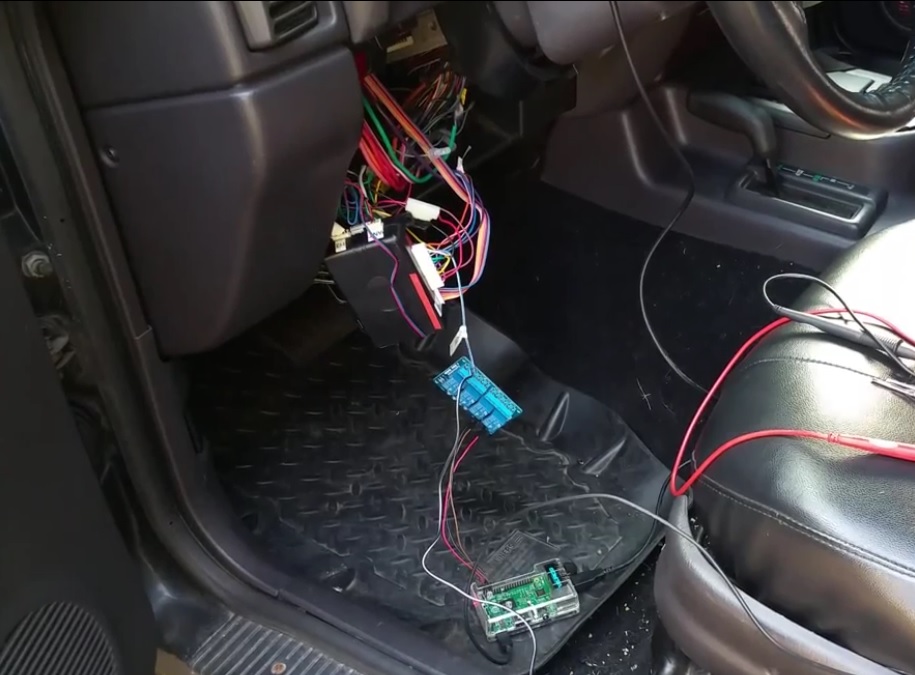
    Pi Remote Start

    And everything should work…as long as you’re connected to your network.

  • Conversation with an Apple Fanboy

    Yesterday there was some conference or something. Guy that sits next to me spent most of the morning reading Engadget and watching some presentation by that guy that’s not Steve Jobs.

    Him: OMG! The new versions of iOS and OSX will allow you to answer phone calls on your computer!!!

    Me: Oh, like Google Voice?

    Him, somewhat indignantly/sarcastically: You mean if I call your cell phone, your computer will ring?

    Me: Yes.

    Look, I’m sure that iProducts are nice and all, it’s just that Apple doesn’t innovate fast enough for me.

  • My month without a cell phone.

    My parents got the family’s first cell phone in around 1994. I got a pager in 1996 around the same time I got my driver’s license (so my parents could randomly ask me where I was). In 1998, I bought my first cell phone for me, but gave it up shortly after that mostly because I didn’t use it enough to justify the cost difference between the phone and the pager. In 1999 I got another one after my mother reported me missing because she called my dorm room at 7pm on a Friday night and I didn’t answer. True story. Cops were not pleased.

    I’ve had at least one cell phone on me at all times since then. I think I’ve had three or four numbers, but a few years ago I signed up for Google Voice and I’ve been using that number ever since. More on why this is important in a minute.

    A few things happened this summer that made me think about ditching my $75/mo cell phone entirely. First, there was the realization that I don’t really use the phone part. A review of my bill shows an average of around 30 minutes per month.

    Secondly, I heard about a family in Canada living like it’s 1986. I’ve had a cell phone for a long time, but I do, in fact, remember the days without them. Somehow society survived and things got done. Surely it wouldn’t be very hard to go back to that, right?

    Lastly, there’s that whole thing with tracking the movements of every American based on cell tower records. If you’d told someone in 1985 that twenty years later not only would they willingly keep a tracking device on them at all times, but that they’d gladly pay for the privilege, you would’ve been thrown in the nut house. Now they just call you a racist. 😀

    So I decided to do an experiment. For the month of October, I simulated not having a cell phone. Simulated, mind you. I still have a contract on this thing until July so I’ve got to pay for it until at least then.

    Google Voice is neat in that you can tell it which phones your GV number forwards to based on a schedule. So, Monday through Friday from 730AM until 530PM, my Google Voice number calls my desk at the office. It always calls my cell phone number. I also get texts through my GV number which can be picked up through the android app, the web site, or I can set them up to go to an email account. During the experiment period, I left the cellphone redirection turned on, but decided to just not answer my phone unless I was at home or at the office. No one knows my actual cell number, so I know that all calls come through GV. I also only made calls either at home or at the office.

    What I mostly use my cellphone for is mobile data. That’s easy enough to shut off. They all have wifi on them, too, so I’d just have to cope with that somehow.

    Now, some of you are thinking this is silly from a cost-savings standpoint because if I used my cell phone at home, that means I’ll need to get a landline. That’s where this little box comes in:

    That’s an OBi100 VoIP Telephone Adapter and Voice Service Bridge. It’s a $40 box that plugs into your router on one side and a standard telephone on the other. It connects to Google Voice and will ring when someone calls your GV number, and will use Google Voice to make outgoing calls. It’s a one time fee that’s half my monthly cell phone bill. (Caveat: No 911)

    The idea was that if my test went well, I’d buy one of these and cancel my plan when my contract is up. Instead of a cell phone, I’d carry a wifi-only tablet like a Nexus 7 or perhaps even an iPad mini.

    I’d get voicemail and text notifications when I was on wifi, which is available practically everywhere now. I’m not so important as to be needed immediately to anyone and any “emergency” at work would have to wait for me to get home to my laptop anyway.

    So on October 1st, I turned off mobile data and wondered what the hell I was doing.

    Turns out….I can totally live without it. The results of my experiment were very positive. I only even received two calls while I was out–one from a dog groomer who accidentally called my cellphone instead of my wife’s, and one from my brother (while I was driving and wouldn’t have been able to answer anyway).

    The mobile data was a little harder. I “cheated” once when I foolishly tried to find an address in a confusing part of town without looking at a map before I left. I did have to temporarily turn on data in order to find out how to get to where I was going. This would be easily remedied by either looking at a map beforehand or by buying a dedicated GPS. I could also, perhaps, get a GPS App for the tablet.

    I did get in trouble once with mrs wizardpc for not effectively communicating travel plans, but that was early in the month and taken as a lesson learned. Easy fix.

    I also noticed that I didn’t get Google Voice notifications if I happened to be off a network when the text or voicemail originally came. Unlike the email applications on Android, you’d have to go into the GV app to see if you missed anything. This can be “fixed” by having GV send notifications to email.

    There were also benefits! I actually had conversations with people while I was out instead of reading news feeds! CRAZY! I paid more attention to my wife and son while in public! INSANITY!

    All in all the experiment went very well, and I’d be all over dumping my cell phone when my contract is up.

    Except.

    That new position I just accepted may require me to be highly available. I’ve got six months to see.

  • Help me pick an HTPC replacement

    Late last year, I built up a home theater PC to replace one that had died. It’s got a very pretty case designed to fit in with audio equipment (protip: if you’ve got young kids or large dogs, don’t hook up the power button to the motherboard. Use the reset switch instead). I put a Blu Ray drive, about 6 TB of storage, and a massive amount of RAM in it. It’s a hoss of a box, and I’m not going to be getting rid of it.

    The new house we bought has a great media room. It’s already wired for sound and has surround speakers in the ceiling. The HTPC would look great on the built-in media rack.

    Unfortunately, the media room is a converted attic space. It’s not connected to the central HVAC in any way. Instead, it’s got a 13 year old PTHP that only has “on” and “not on” as options. They’re kinda spendy to run, and spendy to replace with newer computer controlled models. What that means is that this room will only be climate-controlled when we’re using it, which probably tops out at 2 hours a day.

    Having an always-on server in that kind of situation is bad. I imagine that the room will get to probably 110F in the summer, before you add the waste heat that electronics produce.  I need some sort of set-top box that can do the following:

    • 7.1 audio out, via either optical or over HDMI
    • Handle a variety of video media in 1080p over DLNA or SMB, or run PLEX or XBMC natively.
    • Not get killed by frequent power cycling

    That last one is there because I’m probably going to put all my stuff on a switched outlet and power that guy off when we’re not using it.

    We have a Logitech Revue we’re using in the bedroom now. It’s okay, but it’s discontinued and underpowered.

    The Roku 3 looks like it meets all my criteria (PLEX has a Roku Channel or whatever it’s called)

    The VIZIO Co-Star looks like it has promise, too only does 5.1 sound, so it’s out. I can’t find anything definitive about the Sony NSZ-GS7. We won’t be getting cable at the new place, so most of Google TV’s features are wasted.

    A co-worker just got this and based on his experience, it’s probably not going to meet my needs.

    I haven’t considered any Blu-ray players with network features. Should I?

    What other boxes should I consider?

  • I’ve been predicting this for years

    Starting about 3 years ago, I started saying that we were very close (5 years or less) to having cell phones so powerful that they will be able to replace laptops and desktops.

    The scenario would be that you’d sit down at your desk and plop your phone on a cradle. That cradle would be attached to a monitor, keyboard, mouse, and other peripherals…much like laptop docks today.

    That day is here.

    It’ll still be a few years before this becomes widespread–and a few years after that before Apple revolutionizes the industry by finally adopting it–but this is a great first step.

    It’s going to be 18 months before I can get a new phone, but I’ll be willing to bet that by then most phones will have this capability.

  • Free App of the Day: Army Survival Guide

    Today’s free Amazon app is Army Survival Guide. Just letting you know.

    I’m not sure of the utility of a survival manual that requires an internet connection (Amazon Apps require authentication to Amazon when you start the app) and battery power, but hey it’s free and it might come in handy.

    I also have the dead tree edition which is probably more useful.

  • Picasa albums suddenly disappeared from Android Gallery

    So I’m rocking a Samsung Galaxy S III 4G now and have been for a couple of weeks.

    I also have an Eye-Fi Pro X2 8 GB hooked up to my Canon EOS Rebel T2i. All the kickass pictures I’ve been posting since January have been with that setup.
    Through the magic of computers and Al Gore’s Internet, this means that when I take a picture with my fancy pants camera, it shows up on my phone. The process is roughly this:

    1. Take Picture.
    2. When/If near my home wifi network, the picture is automagically copied to my media server.
    3. Once on my media server, they Eye-Fi software compresses the picture and uploads it to a Picasa web album, using the date the picture was taken to create a new album name.
    4. The album is then synced to my phone.

    This is all entirely automatic. I literally have to do nothing but take the picture and a couple of minutes later it’s on my phone. It’s very, very convenient.

    Well, yesterday I went to show someone a picture of Casey (our Belgian Malinois) and none of my Picasa Web Albums were on my phone! Poof! Gone! TRAGEDY!

    As it turns out, this was an easy fix that took me two days to find. There seems to be a rebranding of Picasa to Google Photos in the midst. When I updated the Google+ App the other day, it turned on “Sync Google Photos” under System Settings->Accounts and Sync->(your google account). That broke the Picasa sync, apparently.

    I unchecked that guy. Then I unchecked and re-checked “Sync Picasa Web albums” and voila! Now I have my pretty pretty pictures back.

    I’m putting this out there in the hopes that someone else who has this problem won’t have to go to the third page of a discussion board on the fifth page of google results in order to find this.

  • AT&T 4G LTE Speeds in Nashville

    Alternate title: Why I’m keeping my Samsung Galaxy S III

    I did mention I bought one, right? It came in yeterday. Should be available in stores June 28th.

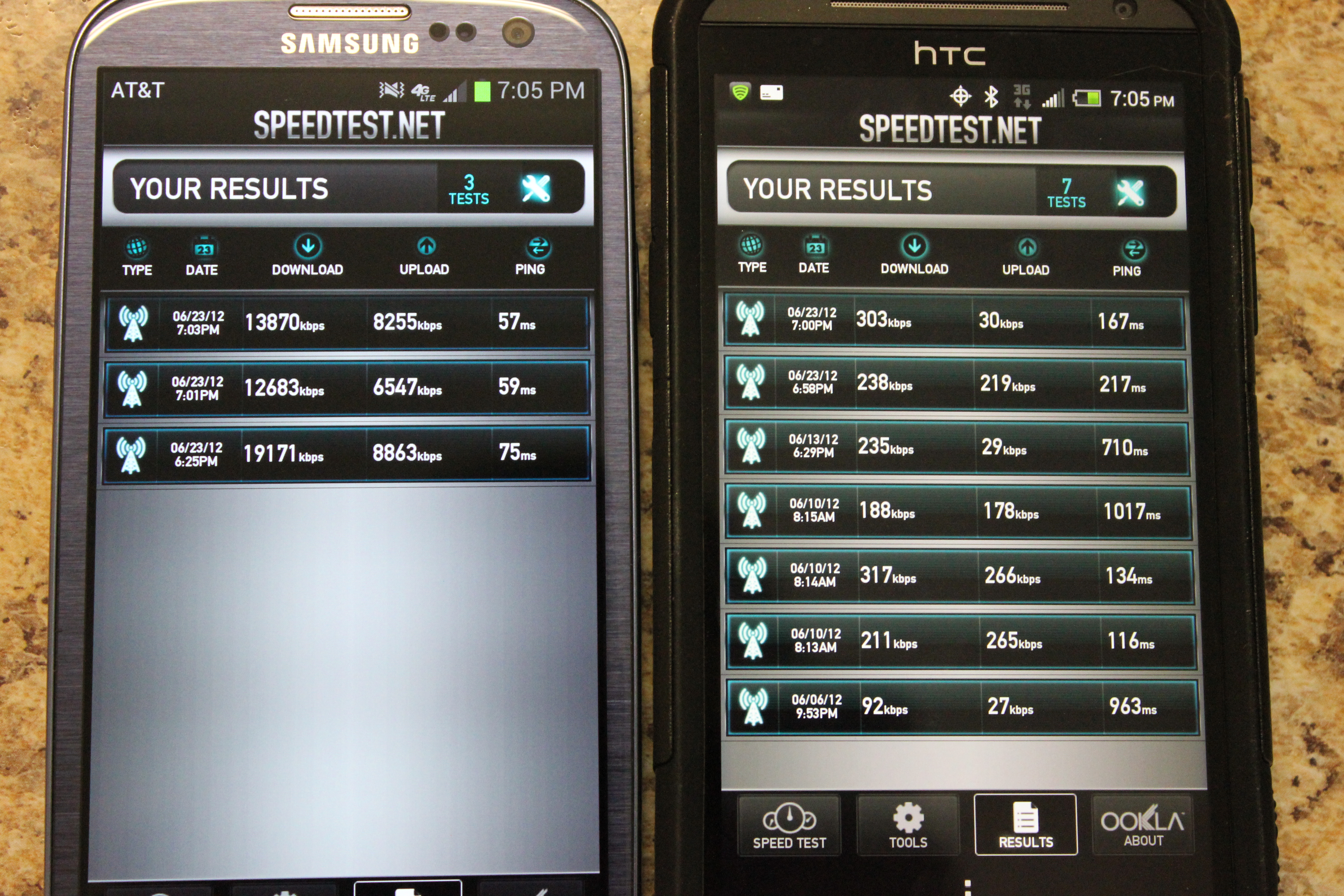
    My first test was 19mbps! NINETEEN! I’ve had recent cable speeds slower than that! It averaged out to about 14 after several tests, but it beats the pants of Sprint’s service at a measly ~200k. I love living in the future.

    LEft: Galaxy S III on AT&T. Right: HTC EVO 4G LTE on Sprint

    Like I said in my post about returning the EVO, some people might say it’s not fair to compare AT&T’s 4G network to Sprint’s 3G, but again these are real-world results. I don’t actually care what Sprint’s network is capable of if I can’t actually get that level of service.

  • Why I’m returning my Sprint Evo 4G LTE

    image
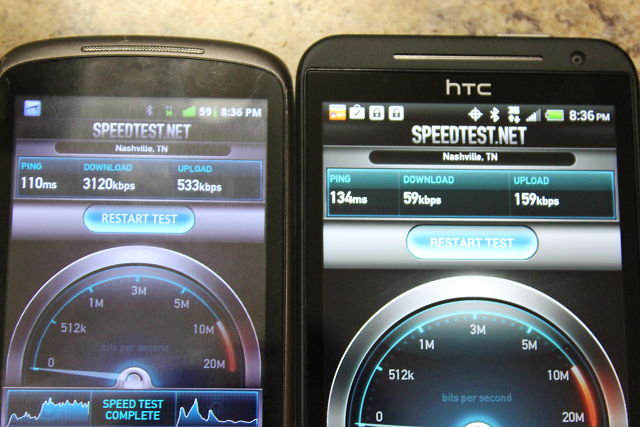
    On the left: My two year old Nexus One on AT&T’s throttled unlimited plan. 3120kbps download speed.

    On the right: My brand-spanking-new HTC EVO LTE 4G. 59kbps download speed.

    That is ridiculous, infuriating, and completely unusable. These tests were done in my home at about 6:30pm last night. On my drive home I decided to download EverNote, and 25 minutes later the ~7mb file was still downloading. That prompted me to do this test. I ran it several times, and the highest speed the EVO got was 80kbps, while the lowest speed the Nexus One got was the one you see there. At 5:30 this morning, I was able to get about 400kbps with the EVO (and 3900kbps with the N1), but by 7am it was back down to about 70kbps. Unlimited data does me no good if I can’t theoretically hit the 5gb cap other providers have.

    I’m starting to strongly consider the advice commenter a leap at the wheel gave me last month. Since the great AT&T throttling, I’ve gone from ~5gb/month average (8gb peak) to ~2gb/month (2.4gb peak) so getting a 5gb or even 3gb prepaid data plan is starting to make a whole lot of sense.

  • Looks like the Galaxy Nexus is getting cheap!

    $149 for the Sprint Version.

    Holy Crap $49 for the Verizon version.

    I’m holding out for the next Evo, which went on pre-order today. I wanted the Nexus, but the delay from the time it was announced to the time the Sprint version was actually available allowed HTC to convince me to buy one of their phones. It’s a fine phone, especially at the price point Amazon is offering them.